
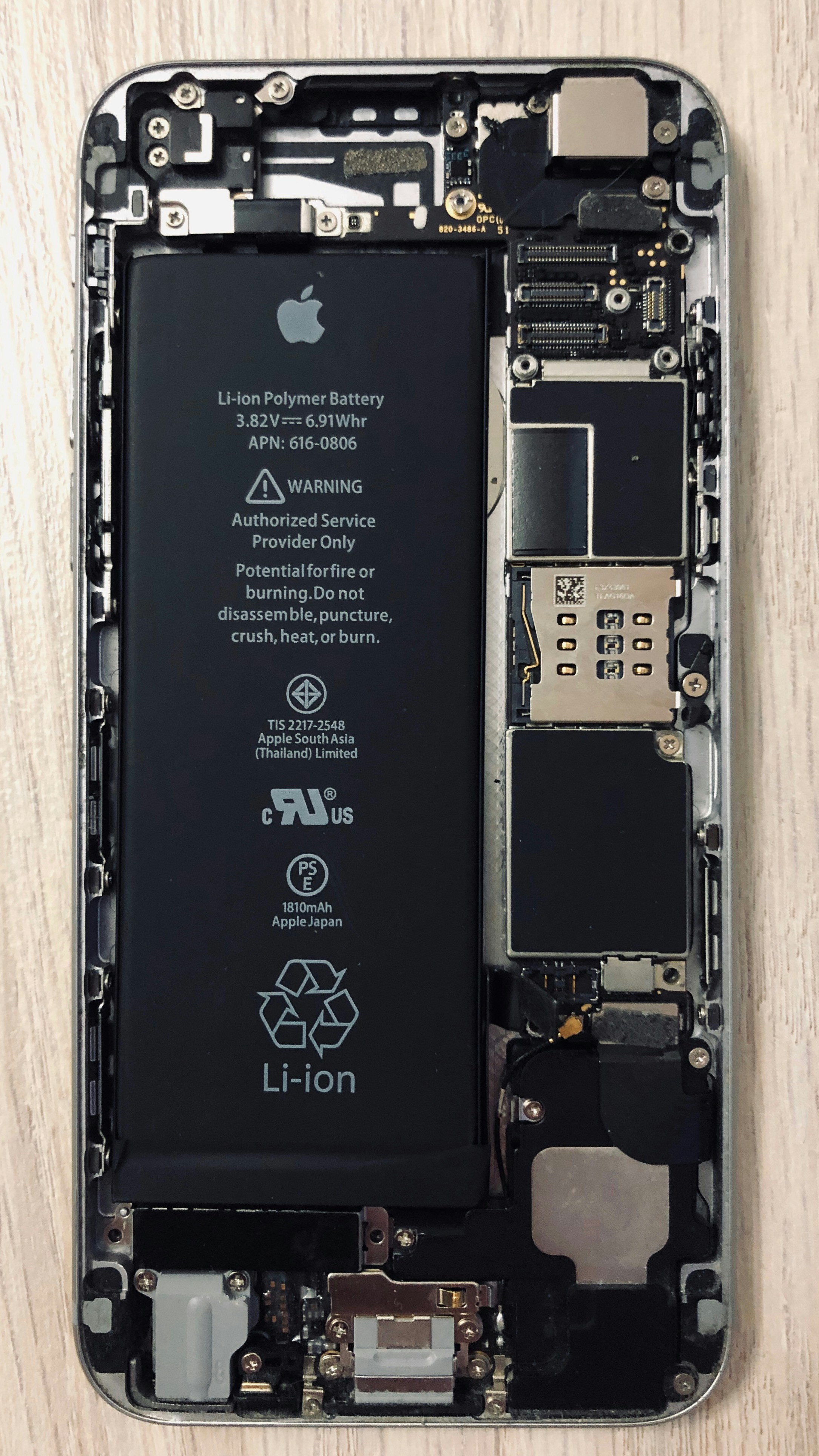
Understanding Smartphone Battery Technology
Smartphone technology has advanced significantly in recent years, and one of the core components that ensures optimal performance is the battery. Predominantly, smartphones utilize lithium-ion (Li-ion) and lithium polymer (LiPo) batteries due to their favorable characteristics such as energy density, lightweight nature, and minimal memory effect. Both types of batteries rely on lithium ions moving between the anode and cathode during discharge and charging cycles, which facilitates energy storage and release.
The chemistry of lithium-ion batteries primarily involves lithium cobalt oxide (LiCoO2) as the cathode material, while the anode is usually made of graphite. In contrast, lithium polymer batteries utilize a gel-like electrolyte that allows for flexibility in shape, which can contribute to thinner smartphone designs. However, both battery types face challenges regarding degradation, which occurs due to factors such as temperature, charge cycles, and age, ultimately affecting their performance and lifespan.
Moreover, the importance of Battery Management Systems (BMS) cannot be overlooked in this discussion. A BMS ensures the battery operates safely and efficiently by monitoring cell voltage, current, and temperature, thus preventing overcharging and deep discharging. By managing these parameters, a BMS can extend the lifespan of a battery and enhance performance, making it a critical component in advanced smartphone hardware modifications. Upgrading your smartphone’s BMS, alongside a custom battery upgrade, can lead to substantial improvements in device performance, addressing issues such as faster charging times and better energy efficiency.
Furthermore, understanding these foundational elements of smartphone battery technology equips consumers with the necessary knowledge to explore advanced smartphone hardware modifications, specifically focusing on custom battery upgrades and BMS swaps. This knowledge not only empowers users to make informed modifications but also helps them appreciate the intricate design and engineering involved in modern smartphone technology.
Identifying the Need for Battery Upgrades
As smartphone technology continues to evolve, the demands placed on batteries have increased significantly, leading to a growing emphasis on advanced smartphone hardware modifications. One of the most critical adjustments users can consider is the upgrade of their smartphone’s battery. Recognizing the signs that indicate a battery upgrade is necessary is essential for maintaining optimal device performance.
One of the most prominent indicators that a smartphone battery may need an upgrade is a noticeable reduction in battery life. If your device no longer lasts a full day under normal usage conditions, despite having a full charge, this is often a clear signal that your battery may be aging. Users may also experience a rapid depletion of battery percentage, which is a common symptom of diminished capacity. Additionally, if your device frequently drains its battery unexpectedly, it might be time to explore custom battery upgrades.
Overheating is another critical sign of a battery that may require immediate attention. A smartphone battery that becomes excessively hot while charging or during regular usage not only raises concerns regarding performance but also poses potential safety risks. Over time, overheating can lead to further degradation of battery life or even hardware damage. As such, recognizing this issue early on can enable users to avoid more severe outcomes.
You may also encounter performance issues, resulting in slower processing speeds and increased lag when executing applications. These inefficiencies can be linked to an underperforming battery, which fails to adequately support the operating system and applications running on the device. Upgrading to a custom battery can help alleviate these problems, providing an enhanced experience and improved efficiency.
While battery upgrades present numerous benefits, users should also be mindful of potential challenges and risks, such as compatibility issues with existing device hardware or the need for specialized installation procedures. Careful consideration and research are paramount for anyone looking to undertake advanced smartphone hardware modifications.
Steps to Upgrade Your Smartphone Battery and Swap the BMS
Upgrading your smartphone’s battery and swapping the battery management system (BMS) can significantly enhance device performance and longevity. Here is a detailed guide on how to proceed with this advanced smartphone hardware modification.
First, begin by selecting the right type of battery. Research the specifications of your smartphone model to ensure compatibility with the new battery. Consider high-capacity lithium-ion batteries that fit within the physical constraints while offering improved performance. Websites like mmangla.com can provide additional resources and recommendations on suitable battery options.
Next, gather the necessary tools before starting the modification process. Typically, you will need a quality screwdriver set, a plastic pry tool, and some tweezers. Additionally, a multimeter can be helpful for testing voltage levels post-installation. Ensure you have a clean and static-free workspace to prevent damage to delicate components.
Before commencing the upgrade, prioritize safety precautions. Turn off the smartphone, disconnect it from any power source, and remove any SIM cards or external memory cards. It’s also advisable to use rubber gloves to handle the battery as it can pose hazards if punctured or improperly connected. Refer to online guides specifically tailored to your smartphone model for insights on how to safely access the battery compartment.
During installation, carefully follow the outline provided by the guide. Pay attention to the connectors and wiring, ensuring they are aligned correctly to avoid potential short circuits. After swapping the battery and BMS, reassemble the device and power it back on. If the smartphone does not start, consider troubleshooting common issues such as improper connections or battery defects.
By diligently following these steps, users can successfully perform battery upgrades and BMS swaps, achieving improved smartphone performance through advanced smartphone hardware modifications.
Best Practices for Maintaining Your Upgraded Battery System
Maintaining an upgraded battery system is crucial to ensure both optimal performance and longevity. When capable of advanced smartphone hardware modifications, one must consider the specific requirements of the custom battery upgrades and the associated Battery Management System (BMS) swaps. Properly managing these components ensures a smooth operation and extends the life of your enhancements.
To optimize battery performance, monitoring its health is essential. Utilizing compatible monitoring apps can provide real-time insights into the status of your battery. These applications often display important metrics such as battery temperature, charge cycles, and overall capacity. Staying informed about these metrics enables proactive management, allowing you to address any potential issues before they escalate.
Charging habits play a pivotal role in maintaining the battery system. It is advisable to avoid letting your battery drain completely before charging, as this can adversely affect lithium-ion batteries commonly used in smartphones. Instead, aim to recharge the battery when it reaches around 20-30%. Additionally, using a charger that matches the specifications of your upgraded battery ensures safe and efficient charging, minimizing the risk of overheating or damage.
Safety measures are paramount when handling upgraded components. Make sure to frequently inspect the battery and BMS for any signs of swelling, leakage, or unusual heat. If you encounter any abnormalities, cease using the device immediately and consult with a professional to assess the situation. Furthermore, avoid exposing the device to extreme temperatures, as this could compromise the integrity of your advanced smartphone hardware modifications.
Incorporating these best practices into your routine will not only significantly enhance the performance of your upgraded battery system, but will also ensure that you enjoy the benefits of your custom battery upgrades and BMS swaps for an extended period.